MongoDB for Storing Web Forum Data

In my first post about collecting data from the talkbass classified forum, we discussed web scraping with PyQuery. We stored the collected information in a dictionary with certain specific keys that I promised to explain in a future post. Those specific choices will become clear in our discussion here where we’ll discuss the NoSQL database management system MongoDB.

“Mongo only pawn…in game of life.”
–Mongo, “Blazing Saddles”

Why MongoDB as opposed to an RDBMS?

Given the relative simplicity and wide adoption of the SQL standard, a relational database management system (RDBMS) would certainly be an appealing option for the purpose of storing the data we’ve scraped. Unfortunately, relational databases come with at least two shortcomings when it comes to storing the largely text-based data we’ve scraped from the talkbass classified forum.

The first issue is the fact that relational databases require the declaration of atomic data types in their schemas. This is particularly restrictive for text fields, for which we would need to determine ahead of time the number of characters allowed for each column. The disk space is then carved out using the same rigid character number for each row (or record) of the table. This can result in a lot of wasted space, especially when text-based fields can vary widely by length. In the talkbass data, the thread_title field is of particular concern.

In addition, a relational database enforces a rigid schema. This means that if we want to, for example, change the number of characters allowed in a text field, we have to effectively recreate the entire table on disk. If we tried to dynamically determine the number of characters allowed for the thread_title field, we’d need to change the schema each time we collected a new longest title. This would have a substantial effect on the speed of our data collection.

The document database MongoDB relaxes both of these restrictions. As of this writing, I still haven’t decided whether I want to store the original thread post, along with the information we’ve scraped from the thread link pages. With MongoDB, I don’t have to worry about changing the schema if I want to add some extra information. I also won’t have to worry about wasting a bunch of disk space if I only wish to collect a subset of the original posts to test the value of the information. MongoDB won’t hog disk space for threads for which I didn’t scrape the original posts.

Of course, there’s no such thing as a free lunch, and this flexibility comes at the cost of query speed. The rigid schema of an RDBMS speeds up the query engine because information is stored in well-defined, organized locations on the disk. This is not the case with MongoDB; I like to think of it like the difference between an array and a list.

Getting started with MongoDB

The MongoDB download page can be found here, and here is a solid tutorial to help you get familiar with how to set up and interact with MongoDB.

After installation, we can create data/mongodb/ in our working directory. Next, we need to establish a MongoDB connection by executing
mongod -dbpath data/mongodb/
from the command line. Once the connection has been established, we’re ready to start interacting with the database using Python.

Pymongo: Inserts

The full context of the code below can be found here, which is the same script that contains the code from my first post. Here, I’ll summarize the key lines of code that are responsible for interacting with MongoDB.

import pymongo
...
# Establish connection to MongoDB open on port 27017
client = pymongo.MongoClient()

# Access threads database
db = client.for_sale_bass_guitars
...
try:
    _ = db.threads.insert_many(document_list, ordered=False)
except pymongo.errors.BulkWriteError:
    # Will throw error if _id has already been used. Just want
    # to skip these threads since data has already been written.
    pass
...
client.close()

We import the pymongo package, and then we create a client that allows transactions with MongoDB through the connection we established by running mongod. Next, we tell the client to load the for_sale_bass_guitars database. If the database does not exist, it will be created automatically, otherwise, the existing database will be loaded. At this point, we’re ready to make insertions, deletions, and queries.

In the try block, the db.threads.insert_many() method allows us to insert multiple documents into the threads collection simultaneously. Think of a “collection” as a “table,” and just as for the for_sale_bass_guitars database, the threads collection will be created automatically if it does not already exist. In our example, document_list is a list of 30 dictionaries that contain the information we’ve scraped from each of the for-sale thread links on a single page of the talkbass classifieds. As a reminder, each document is a dictionary defined as follows:

self.data['_id'] = self._extract_thread_id()
self.data['username'] = self._extract_username()
self.data['thread_title'] = self._extract_thread_title()
self.data['image_url'] = self._extract_image_url()
self.data['post_date'] = self._extract_post_date()

MongoDB uses _id to indicate the unique key identifying each document. If this key is unspecified in the inserted document, MongoDB will automatically create it for us. Since talkbass has already assigned each thread a unique id, it would be redundant to allow MongoDB create a new identifier, so we set _id equal to the thread id value.

MongoDB guards against the insertion of multiple documents with the same _id, which is supposed to be a unique key, after all. By setting the ordered argument of the insert_many method to False, we insure all documents in document_list that are not present in the threads collection do get inserted before a potential exception is thrown based on an _id conflict. If ordered were set to True (the default behavior), no documents appearing after the first instance of a duplicate _id will be inserted, which is not the behavior we want in this case.

Finally, the except block gracefully handles the BulkWriteError thrown when an _id has been duplicated. This allows us to re-scrape the classified forum without having to worry that we’ve already seen some of the threads and committed them to our database. Then, once we’re done scraping, we close the client before exiting the Python script.

Pymongo: Queries

Once we’ve inserted documents into MongoDB, we need the ability to query them. Again, this requires a connection established by mongod before interaction via pymongo

import pymongo
...
# Establish connection to MongoDB open on port 27017
client = pymongo.MongoClient()

# Access threads database
db = client.for_sale_bass_guitars

# Get database documents
cursor = db.threads.find()
...
for document in cursor:
    thumbnail_url = document[u'image_url']
...
client.close()

Just as before, we create a client and load the for_sale_bass_guitars database. Next, we call the find() method on our threads collection to create a generator that gives us access to our stored documents. Then we can create a loop using that generator to access the information we wish to collect. Note: because cursor is a generator and not a list, we can’t repeatedly access the first document of the threads collection using cursor[0]. If we wish to reload the first document, we need to rerun the find() method.

The context of the code above can be found here, where I use the stored image urls to scrape the bass image associated with each for-sale thread link. The scraping and preprocessing of these images will be the subject the next post in this series.
Adventures in Contributing to Scikit-Learn.

In this post, I’ll share my experience with submitting a contribution to one of the most popular machine learning libraries for the Python programming language, Scikit-Learn. My goal here is not to go into depth about the algorithmic details of the bug I fixed, although a few of the links below will provide that context. Rather, I’d like to focus on the process and some tools I used to help the workflow proceed smoothly. My hope is that if you decide you’d like to contribute to an open source project, I’ll have provided some tricks and tips that will make it easier for you to do so.

Submitting an Issue

screen-shot-2017-01-14-at-9-43-36-am

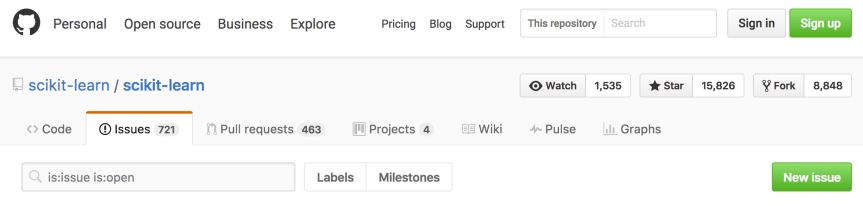
Once I found a bug in the code base, the first thing I had to do was submit an issue. Scikit-Learn has its own specific protocol for filing bugs which you can read here. I submitted a minimal piece of code that reproduced the bug, a description of the unexpected behavior, documentation on which versions of various Python libraries I was using, and information about my operating system. Here are links to the issue I submitted and to the reproducible code that demonstrated the bug. Of course, before doing any of this, I checked the issue history to see if anyone else had already made the same request.

Once I posted my issue, the Scikit-Learn administrators determined whether they could reproduce the bug. GitHub user amueller labeled my issue a bug, indicated that it should be fixed before the release of Scikit-Learn version 0.19.0, and requested a contributor.

Keep calm and carry on
–British WWII propaganda

Patience

Now is a good time to stop and consider the hard work of the folks charged with maintaining the Scikit-Learn code base. As open source software, no one is paid for full-time upkeep of Scikit-Learn, and the volunteers who track the issues we users submit are largely doing so out of the kindness of their hearts. The company I work for is paying my team of data scientists millions of dollars to derive business value using Scikit-Learn, which we all have access to for free. I kept this at the forefront of my mind whenever I started getting a little frustrated or overwhelmed. Any expectation of instant interaction is misplaced. I would like to thank GitHub users amueller and jnothman for helping me navigate the contribution process.

The Contribution Process

About a week after I submitted my issue, no one had volunteered to contribute the fix and figured I ought to roll up my sleeves and tackle the problem myself. Ultimately, this came with the reward of getting my name on the contributor list, which was well worth it.

Identifying the Bug

screen-shot-2017-01-14-at-11-28-52-am

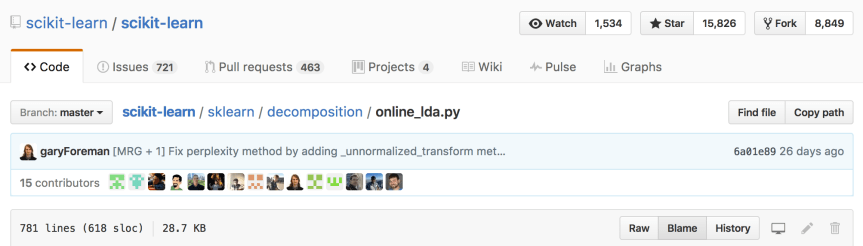
Finding the line of code that introduced the bug wound up being easier than I would have guessed. Although I didn’t learn about this feature until after my pull request was merged, I strongly recommend using GitHub’s Blame feature to determine who last edited the code. If I were to start over, I’d mention the contributor who introduced the bug at the very beginning of the conversation. That way, he or she could have offered advice on how to best resolve the conflict.

Forking, Cloning, and Branching the Repository

Once I found the code I needed to change, I Forked the repository to my own GitHub account and Cloned that Fork to the computer where I made the edits. I also made sure to Sync my Fork to the master copy of the repository. Syncing was important because while I was implementing my patch, dozens of other users were making edits and issuing their own pull requests. By syncing often, I kept my clone of the repository up to date. Finally, as per the Scikit-Learn contribution instructions, I created a new branch in my local clone of the repository. This is where I made changes to the code.

Creating a New Conda Environment

Before I could run the code contained in the cloned repository, I had to build it. But before doing that, I created a new conda environment in which to develop the code. This ensured that when I built the development version of Scikit-Learn, no conflicts occurred with the version of Scikit-Learn that is included in my base Anaconda Python installation.

Fixing the Bug

There was more than one way to implement my fix to Scikit-Learn, which I’m sure is quite common. Through trial and error, I learned that the admins definitely preferred that I not change the public API. During my first attempt to fix the bug, I added an argument to the transform method of the class I was editing. Because the transform method is implemented pretty much the same way in every class throughout the entire code base, this solution was not acceptable. Also, the admins were not in favor of storing a large amount of extra information in class attributes to be passed around to the methods of the class. The idea here was to avoid the risk of taking up too much memory, which is a reasonable concern for the implementation of a machine learning algorithm. My ultimate solution was highly abstracted from the user, although certain functionality of the module had to be deprecated.

I also had to add and modify several unit tests in the module I modified. This demonstrated that the new code worked as intended, and it will protect my additions from breaking when future edits are made by other users or even myself.

Pylint and make test

Once I implemented my changes to the source files, I found Pylint and make test to be incredibly helpful. Pylint is a tool for checking that your Python code is error free, and it makes certain stylistic checks as well. Mainly, I used Pylint to ensure I didn’t have extra white space floating around my source code, which happened when my text editor made automatic indents. Pylint will also tell you about a ton of other stylistic problems with the code, e.g., variable names are too short, too many arguments in a function, etc. I only concerned myself with the white space warnings and the errors, since these will fail Scikit-Learn’s test modules (discussed below). Before I started using Pylint, I wound up having to push commits entitled “remove superfluous white space,” which I found to be embarrassing.

I was able to execute all of Scikit-Learn’s unit tests by running make test in the base directory of the cloned repository. I’ll mention more below about how Scikit-Learn has GitHub set up to automatically run these tests for a new pull request. I found the process to be quicker when I ran these tests locally to make sure I passed.

Sync, Merge, Commit, Push

After passing Pylint and make test,  my first step was to sync the master branch of my cloned fork to the master of Scikit-Learn’s copy of the repository as I mentioned above. Next, I merged any new code from the upstream master to the branch I created to make my edits. Then I committed my changes. Finally, I pushed my new commit to the remote fork I created in my GitHub account.

Submitting a Pull Request

screen-shot-2017-01-15-at-3-34-02-pm

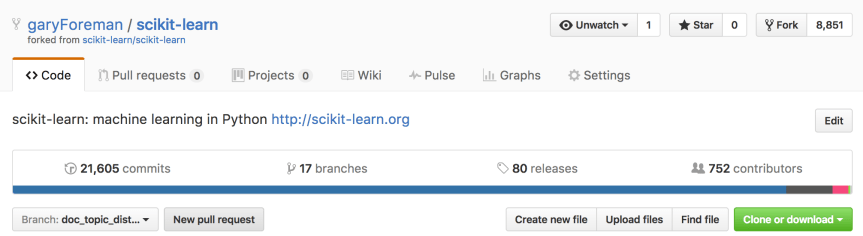
After the first time I pushed code to my remote fork, I had to open a pull request. First, I switched my branch to doc_topic_distr_deprecation using the drop down menu. Then I hit the “New pull request” button.

screen-shot-2017-01-15-at-3-34-34-pm

Next, I completed the pull request form that is automatically populated in the comment field. I hit the big, green “Create pull request” button, and my request was officially submitted. At this point, the pull request was permanently associated with remote copy of the branch I created for my edits. This meant that any future commits I pushed to this branch were automatically incorporated into the pull request, and I didn’t need to open new requests as I made updates to my patch.

The Test Modules

screen-shot-2017-01-15-at-6-46-03-pm

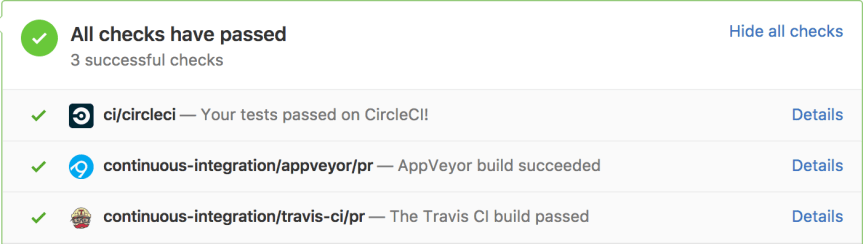
Immediately after submitting a pull request, the user’s code is subjected to a few test suites that run automatically via GitHub. While I never took the time to look into exactly what is run in each of these tests, I found them to be similar to running Pylint and make test as I described above.

The keen reader may find it redundant that I’ve run the test module locally only to have it rerun after submitting the pull request. The key here is that it can take hours for the test modules to run via GitHub because other users are pushing their code as well. More than once, I wound up several commits down in the queue only to have the test tell me that I had an extra space at the end of a line. Once I wised up and began using Pylint, passing these test modules became much less tedious.

As I mentioned in the previous section, after my first submission, the pull request remains linked to the branch I created in my GitHub fork. As I iteratively updated my patch, the pull request was updated with each push and these test modules were run automatically.

Conclusion

From the time I first submitted the issue, it took about three weeks until my pull request was merged. The process was very much iterative, and I had a lot of suggestions from the Scikit-Learn admins. I’ll close by summarizing the tips and tricks I’ve discussed in this post:

  1. Patience
  2. Git Blame
  3. Conda Environments
  4. Don’t mess with the public API
  5. Keep memory usage low
  6. Pylint
  7. make test

PyQuery for scraping the talkbass classifieds forum

The talkbass classified forum has been a go to source of data for my side projects (e.g., talkbassPricing, talkbassHistory, and talkbassFilter). As a data scientist and a bass player, talkbass has been an excellent resource for me to combine my profession and my hobby. I’m currently in the midst of my most ambitious pursuit yet, which I will be documenting in this blog spot. All good stories start at the beginning, and in this case, the beginning is data scraping.

Once you add web scraping to your toolbelt the world (wide web) becomes your oyster. Of course, many sites, e.g. Twitter, offer API’s that allow users to easily pull down data sets, but alas, talkbass is not one of them. I’ve always used PyQuery for my data scraping projects, and this choice seems somewhat rare among the data science community. Nearly everyone else I know uses Beautiful Soup, which, from what I hear, is a perfectly fine solution. I do not wish to make the argument for one package over the other. Rather, I intend to introduce PyQuery to those new to web scraping and to those Beautiful Soup users who may interested in an alternative.

Quickly, a word of caution, then, I promise, we’ll get to the code. Programmatically accessing web content is by design much faster than the human interactions sites were designed to serve. It is polite to include some time during which your program sleeps so as not to overwork the web servers. When scraping data, please be mindful of the other users of the site and especially of the folks who work hard to serve its content. If your scraper is using too much bandwidth, web admins can identify your IP address and ban you.

Finally, to the good stuff. PyQuery is a wrapper around the lxml python library and emulates the syntax of the javascript library jQuery. The PyQuery documentation itself is not exactly vast, but that’s ok because virtually all jQuery documentation is directly relevant. The reason I’ve always used PyQuery is that when I was getting started with web scraping, I was also pursuing a project using javascript and jQuery; it was a two birds, one stone situation. If you’d like to get familiar with jQuery before diving straight into web scraping, Codecademy is an excellent resource.

You can install PyQuery using
pip install pyquery.
Then load the library using
from pyquery import PyQuery as pq.
We can initialize a PyQuery object using the web url of interest using
d = pq(NAME_OF_URL),
where the site we want to load in this case is https://www.talkbass.com/forums/for-sale-bass-guitars.126/. Let’s open up this page in a web browser and have a look around. The typical layout is 30 basses per page, and on the first page, there are two sticky threads from which we do not wish to scrape data.

screen-shot-2016-12-31-at-12-48-41-pm

To be able to scrape the data we want to keep, we need to know what the html structure of the web page looks like. For this, I’ve found the Mozilla Firefox Web Console to be invaluable. The Google Chrome browser also has similar functionality, but I’ve never used it. To access the console from Firefox, the easiest thing to do is right click an element on the page, and select “Inspect Element”. The console will pop up in the bottom of your web browser and the html block that corresponds to where you clicked will be highlighted.

As you hover over the lines of html in the console, the corresponding items on the web page will be highlighted. Alternatively, if you click the cursor icon at the top left of the console, you can hover the web page and the corresponding lines of html will be highlighted. I’ve found this to be the easiest way to figure out where the data I want to scrape is embedded in the html. A final word on the console, you’ll see grey triangles next to the lines of html; you can click on these to expand or contract the html objects. If you’re not seeing the html code you are looking for, try expanding some of the html objects.

“The L. I. Mystique — you sneak to peak
A look, and then you know that we’re never weak.”
–Chuck D, “Timebomb”

We’ve already loaded the page into a PyQuery object using the code above. Next, let’s create a list of PyQuery objects that contain the thread data.

def get_threads(d):
     """
     d : a PyQuery object containing web page html
     returns: list of thread lis with id beginning with "thread-" and class not
     containing the string 'sticky'
     """

    return d('li[id^="thread-"]:not(.sticky)')

Each thread is identified by an html list item (li) with id attribute beginning with (^=) “thread-“. But as I mentioned, the first page has a couple of sticky threads regarding the rules of the forum that don’t contain information about basses for sale. The code :not(.sticky) tells PyQuery to exclude any threads that have the string “sticky” as part of their class (.) attribute.

Next, let’s feed this list to a function that will extract the data we wish to keep and create a list of dictionaries corresponding to the threads. The choice of dictionary objects and some of the naming conventions will become clearer in my next post when I’ll discuss MongoDB.

class ThreadDataExtractor(object):
    """
    Extracts thread data to be stored as MongoDB document
    Attributes
    ----------
        thread: lxml.html.HtmlElement
            contains a for sale thread link
        data: dictionary
            contains thread data
    Methods
    -------
        extract_data
            populates fields of data attribute
    """

    def __init__(self, thread):
        self.thread = thread
        self._d = self._parse_thread()
        self.data = {}

    def _parse_thread(self):
        return pq(self.thread)

    def extract_data(self):
        self.data['_id'] = self._extract_thread_id()
        self.data['username'] = self._extract_username()
        self.data['thread_title'] = self._extract_thread_title()
        self.data['image_url'] = self._extract_image_url()
        self.data['post_date'] = self._extract_post_date()

    def _extract_thread_id(self):
        return self._d('li').attr['id'][len('thread-'):]

    def _extract_username(self):
        return self._d('li').attr['data-author']

    def _extract_thread_title(self):
        return self._d('.PreviewTooltip').text()

    def _extract_image_url(self):
        return self._d('.thumb.Av1s.Thumbnail').attr['data-thumbnailurl']

    def _extract_post_date(self):
        post_date = self._d('span.DateTime').text()
        # if thread has been posted within the last week, date is contained
        # elsewhere
        if post_date == '':
            post_date = self._d('abbr.DateTime').attr['data-datestring']

        return post_date

The first element we want to keep is the thread id. As we saw above, all the threads can be identified by a list item with id attribute beginning with “thread-“. We want to keep the list of digits that follow in the id, and we’ll use them as a unique identifier for each thread. Also, we can easily navigate to the thread page itself using the url https://www.talkbass.com/threads/*. And yes, the * wildcard can be used in urls. We can also extract the thread author from the list item attribute “data-author”.

The thread title can be pulled from the text of a hyperlink tag with “PreviewTooltip” class (.) attribute. Another hyperlink tag with class “thumb.Av1s.Thumbnail” contains the image url in its “data-thumbnailurl” attribute. Finally, the post date is a little tricky. If the thread is more than a week old, the post date can be found in a span tag with class attribute “DateTime”. If the thread is more recent, talkbass will display the day of week of the post rather than as month, date, year. In this case, the date can be found in an abbreviation tag with class “DateTime” under the attribute “data-datestring”.

Hopefully this example will have you well on your way to using PyQuery for your web scraping. Here is the github link to where I’ve hosted the code copied above. Additional examples of how I’ve used PyQuery can be found here and here.